Interval Timer: Free Online HIIT and Workout Timer
Build any interval workout, from HIIT circuits to an AMRAP finisher, then switch between six timer modes without leaving the page.
TL;DR
This interval timer defaults to 40 seconds of work and 20 seconds of rest for 10 rounds, but you can change every number for HIIT, circuits or AMRAP work. Pick your get-ready time, rounds and sets, then run it full screen with a big clock, beeps and a bookmarkable link.
Interval
0:40
Total Time: 9:50
Settings
Your screen stays awake while the timer runs, in browsers that support it.

Log the Workout This Timer Paces
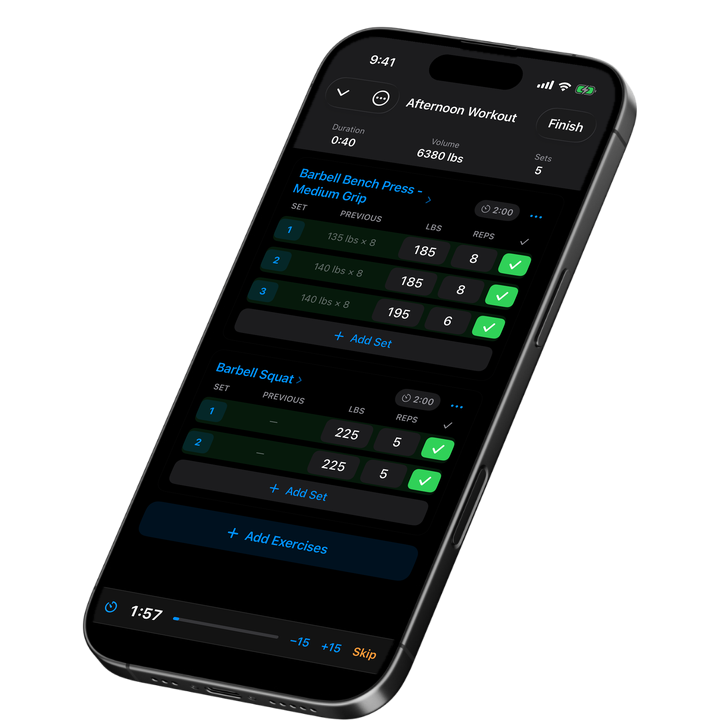
PR Streak logs every set from the training you pace with this timer, and starts your rest timer automatically the moment you finish a set, with a countdown on your Lock Screen and in the Dynamic Island.

How to Use This Interval Timer
Set your work time and rest time, pick your rounds and sets, then hit start. A 10-second get-ready countdown gives you time to get into position, and you can adjust it or turn it off entirely.
While it runs, a big clock stays readable across the gym, with a round and set counter and the total time left. Pause, resume, reset or skip a phase in one tap, and beeps mark the last 3 seconds of every phase plus each switch. Turn the sound off if you'd rather train quietly.
Run it full screen, and your screen stays awake the whole time in browsers that support it, so the display never dims mid-round.
Interval Timer Modes: HIIT, Tabata, EMOM, AMRAP, Boxing and Rest
This page opens on interval mode, 40 seconds of work and 20 seconds of rest for 10 rounds, but the tabs switch the whole engine to five other modes: Tabata (20 seconds of work, 10 seconds of rest, 8 rounds), EMOM (a new interval every minute), AMRAP (one countdown for as many rounds or reps as possible), boxing rounds (3-minute rounds, 1-minute rest) and a rest timer with quick picks.
Switch modes any time without losing your setup. Each mode keeps its own defaults and every field stays adjustable, so a HIIT circuit and an EMOM finisher can live in the same tab.
What's a Good Interval Timer Setup for HIIT?
This timer's default, 40 seconds of work and 20 seconds of rest for 10 rounds, is a solid starting point for HIIT: hard enough to raise your heart rate, short enough to sustain across multiple rounds. Shortening the work interval or lengthening the rest makes each round easier to sustain, and the reverse makes it harder.
The name "interval training" covers a wide range of protocols. A landmark study by Tabata and colleagues had subjects on a cycle ergometer repeat 20-second, all-out efforts with only 10 seconds of rest, seven or eight times a session, five days a week for six weeks, and measured a 7 ml/kg/min rise in VO2max plus a 28% rise in anaerobic capacity.
Circuit training works the same way: use your station time as the work interval and your transition time as the rest, with your number of stations as the rounds.
How Do You Save or Share an Interval Timer Setup?
Every setting, work, rest, rounds, sets and prep time, saves into the page's own link. Copy it after you dial in a workout, and it opens with those exact numbers ready to go, so you can bookmark your own routine or send it to a training partner.
Interval Timer Safety Tips
- Warm up before your first hard round, especially when the work interval is short and intense.
- Watch your form as fatigue builds late in a set of rounds, and skip or end a round early if it breaks down.
- Keep water nearby, and lengthen the rest if you need more recovery between rounds.

Used by lifters following PPL, 5x5, upper/lower, and more.
Frequently Asked Questions
What is an interval timer?
An interval timer alternates timed work and rest periods for a set number of rounds, so you don't have to watch a clock during a HIIT circuit, a conditioning finisher or any workout built around timed efforts instead of a fixed rep count.
What's a good interval timer setup for HIIT?
This timer's default, 40 seconds of work and 20 seconds of rest for 10 rounds, is a solid all-around HIIT setup. Shorten the work interval or lengthen the rest to make it easier, or do the opposite to make it harder, then save your setup with the link.
What's the difference between this and a Tabata timer?
Tabata is a specific protocol: 20 seconds of work and 10 seconds of rest for 8 rounds. This interval timer can run that exact pattern, or any other work-to-rest ratio and round count you choose. Open the Tabata timer if you want Tabata's numbers as your default.
Can I use this as an AMRAP timer?
Yes. Switch to AMRAP mode for a single countdown with no work-rest split, useful for an as-many-rounds-or-reps-as-possible finisher. Set the time cap, and the clock counts down until it hits zero. See AMRAP sets for how training programs use one.
Does this timer keep my screen from locking?
Your screen stays awake while the timer runs, in browsers that support it, so the display doesn't dim or lock mid-round. Keep the tab open and full screen for the clearest view across the gym floor.
Can I turn off the beeps?
Yes. A sound toggle turns off every beep, including the countdown in the last 3 seconds of a phase and the switch between work and rest, for training in a quiet space or with your own music.
Can I share my timer setup with someone else?
Every setting lives in the page's link, so copying it after you dial in a workout and sending it over gives your training partner the exact same timer, ready to start.
Sources
- Tabata I. et al. (1996), Med Sci Sports Exerc 28(10):1327-30, "Effects of moderate-intensity endurance and high-intensity intermittent training on anaerobic capacity and VO2max"
- Schoenfeld BJ et al. (2016), J Strength Cond Res 30(7):1805-12, "Longer Interset Rest Periods Enhance Muscle Strength and Hypertrophy in Resistance-Trained Men"
More Free Tools
Tabata Timer
Free online Tabata timer: 20s work, 10s rest, 8 rounds, repeatable sets and a shareable link.
EMOM Timer
Free online EMOM timer: a new interval every minute, adjustable length and count, with a shareable link.
Rest Timer
Free rest timer with quick picks, +15/-15 second buttons and a one-tap restart between sets.
Boxing Timer
Free online boxing round timer: 3-minute rounds, 1-minute rest, 12 rounds by default, adjustable and shareable.
1RM Calculator
Estimate your one-rep max from any set, with a rep-max chart and NSCA training percentages.
Strength Calculator
See your squat, bench and deadlift percentile against real competitive lifters in your weight class.